Showing posts with label send. Show all posts
Showing posts with label send. Show all posts
Sunday, December 25, 2016
4 Websites To Send Anonymous SMS Without Registration
4 Websites To Send Anonymous SMS Without Registration

1. http://smsti.in/send-free-sms/
Smsti.in allows you send message of complete 160 words and without any ads.There message service is very fast and you can even check the delivery reports of the sms that has been sent.
They provide their sms services for Indian Mobile numbers only.
2. http://seasms.com/#type
2. http://seasms.com/#type
Seasms allows you to send messages all over the world.This is the only free Sms service that I found which all allows you to send worldwide messages anonymously.
They also provide 160 character support for SMS.
3. http://spicesms.com/sendsms.php
Spicesms allows you to send sms only in India with 130 character support for sms.They service is very fast and sms are delivered instantaneously
4. http://www.bollywoodmotion.com/free-long-sms-india.html
4. http://www.bollywoodmotion.com/free-long-sms-india.html
Bollywoodmotion is one of the best sms website as you can send sms upto 500 characters long.
They do not include any ads into your message and messages are delivered in real time.This service is available only for Indian mobile numbers
If you know any other sms services that allows you to send messages without registration then do share with us by commenting.
To send Anonymous EMAILS For Free Click Here
NOTE:- Don’t send abusive messages to somebody using the above site as you can be traced .
Available link for download

Friday, October 28, 2016
5 Easy Steps To Send APK Files apps and Other Format On whatsapp
5 Easy Steps To Send APK Files apps and Other Format On whatsapp

Couple of months ago, whatsapp enabled document sharing on it platform.
Although that feature receive positive response from it user, there are still many files format like APK, jar, ico that are cannot be shared.
Unlike Telegraph that allows its users send and receive APK file format whatsapp dont.
In this post ill be giving details on how to send and receive Android apps on your Whatsapp.
HOW TO SEND APK RECEIVE
ANDROID APPS ON WHATSAPP
1.Locate the file(app) you want to share on file manager.
2.After locating the file(app) rename it.
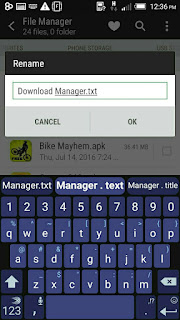
For example in the screen shot below I renamed "download manager .apk to download manager.txt
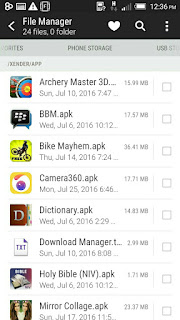
3. After renaming the file, open Whatsapp go to the friend or group you want to share the file(apk) with.
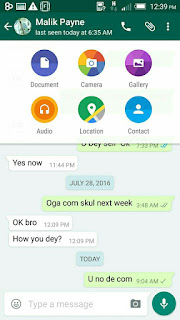
4. Click on share/attachments
*Then click on " document"
5.Locate the file you just rename the click on it.
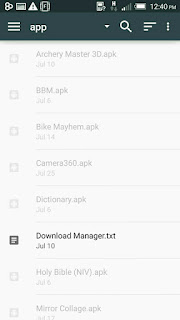
The File(apk) will be send to the recipient.

The recipient can locate the file/app in " SD card > Whatsapp > Media > Whatsapp documents > Receive
NOTE: The person you shared the APK file to, will have to rename it back to its original format for it to work...
That is" download manager.txt should be renamed to download manager .APK for it to appear as APK file.
Easy right?
Dont forget to share with friends.
Available link for download
Subscribe to:
Posts (Atom)